
UX Localization Guide: Making Global Products Feel Local
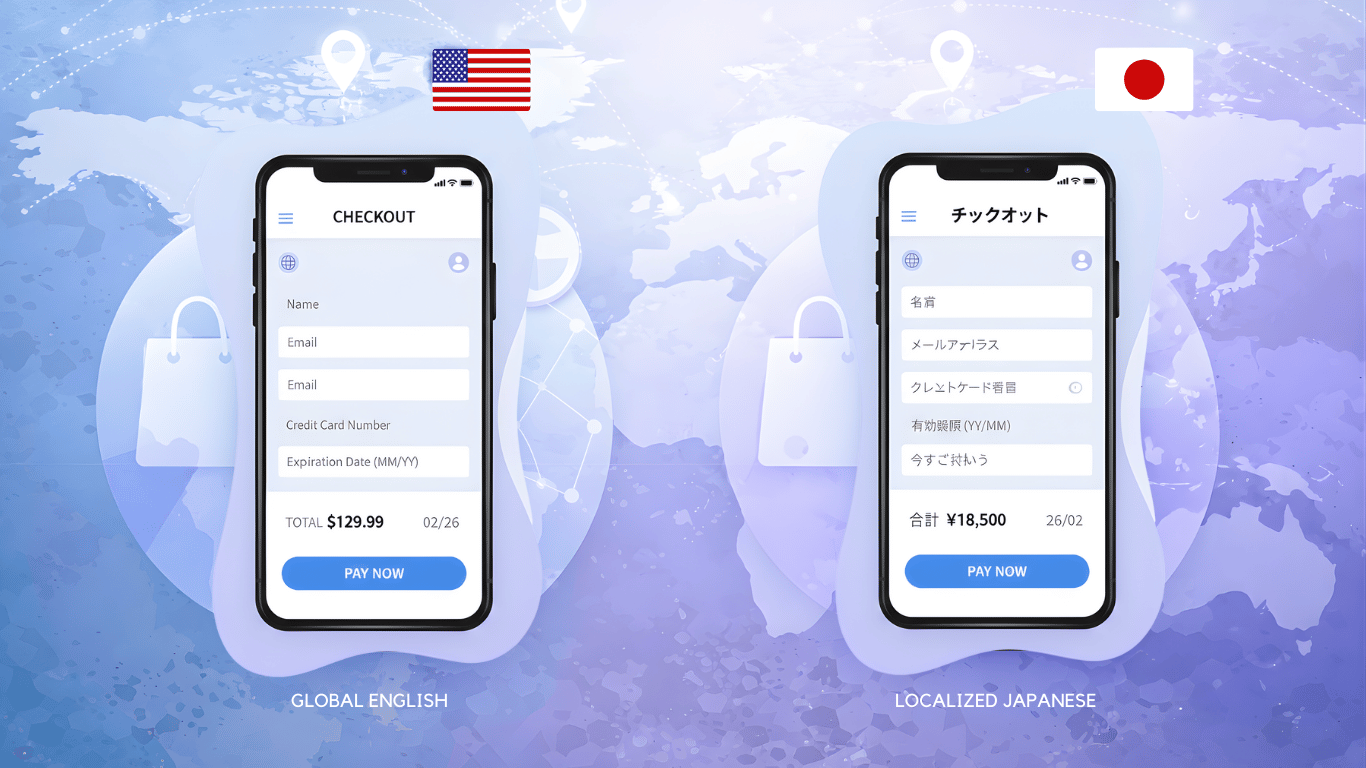
Imagine you are in Brazil and download a popular international fitness app. It is in Portuguese, so reading instructions is easy. But then things get confusing. Your step goal is listed in miles instead of kilometers, leaving you unsure how far you have really walked.
The nutrition suggestions mention foods that are nearly impossible to find at your local stores, and the app only accepts U.S. credit cards. Wouldn’t it be easier if the app felt like it was made for you? That seamless experience is exactly what UX localization delivers.
What Is UX Localization?
At its core, localization means adapting a product so it feels natural in a specific cultural context. It encompasses linguistic, visual, and behavioral adjustments that make an experience resonate locally. Meanwhile, translation is just one part of this broader process, focused strictly on converting text from one language to another.
UX localization, therefore, is user experience (UX) design that feels native to a specific audience. It requires tailoring elements such as date formats, payment options, imagery, interaction patterns, and communication style so users do not just understand your product; they connect with it.
To put it plainly, translation helps users read your product, but localization helps them feel like it was made for them.
Why Localization Matters for User Experience
Imagine launching a fitness app globally without accounting for local measurement systems, motivational language, or cultural aesthetics. A user in Japan might see steps in miles instead of kilometers, while a Brazilian user might see user interface imagery that does not resonate with local sports culture.
Without UX localization, the product feels foreign and awkward, reducing engagement, satisfaction, and conversions.
Here is why UX localization is essential:
- Boosts engagement: Users interact more deeply when the interface aligns with their language, habits, and cultural expectations.
- Improves usability: Preferences such as layout structure and navigation style vary by region; tailoring these improves ease of use.
- Increases conversions: Localized experiences reduce friction at critical decision points like checkout or registration.
- Builds trust: A product that respects local norms shows users they are understood and valued.
- Expands market reach: Localization removes barriers to adoption, enabling broader global growth.
In short, localization transforms a product from “global” to “local.”
Core Elements of UX Localization
Making a product feel local is not a single task. It involves a range of design and content considerations. Below are the key areas where UX localization matters most:
1. Language and Communication Style
Language is the most obvious localization factor, but it goes far beyond literal translation. It includes:
- tone
- formality
- idioms
- emotional context
A casual and humorous message such as “Great job, you smashed it” may feel friendly to users in the United States, but the same tone can seem unprofessional or uncomfortable to users in countries like Japan, where communication is generally more formal.
Good localization adjusts the voice of the product so it matches local expectations. When the tone feels natural and culturally appropriate, users are more likely to trust the product and feel comfortable interacting with it.
2. Formats and Conventions
Different countries follow different conventions for:
- dates
- numbers
- currencies
- measurements.
For example, a date shown as 03/07/2026 can mean March 7 in the United States but July 3 in many European countries. Similarly, some regions use commas for decimals, others use periods, and currencies are displayed in different ways.
If an e-commerce app shows prices only in U.S. dollars or uses miles instead of kilometers, users may feel confused or slowed down. Adapting these formats to local standards makes information easier to understand and improves overall usability.
3. Visual Design and Imagery
Visual elements also require localization because symbols, colors, and images carry different meanings across cultures. An icon such as a thumbs up may be seen as friendly and positive in some countries, but it can be offensive or confusing in others.
For example, a finance app might replace gesture-based icons with neutral symbols like checkmarks or simple confirmation messages when launching in new markets. Localizing visuals ensures that users interpret messages correctly and feel comfortable with the interface.
4. Navigation and Interaction Patterns
User experience design is shaped by cultural expectations. Many Western users prefer clean layouts with minimal text and clear call-to-action buttons. In other regions, users may expect more detailed explanations, visible menus, and additional guidance before taking action.
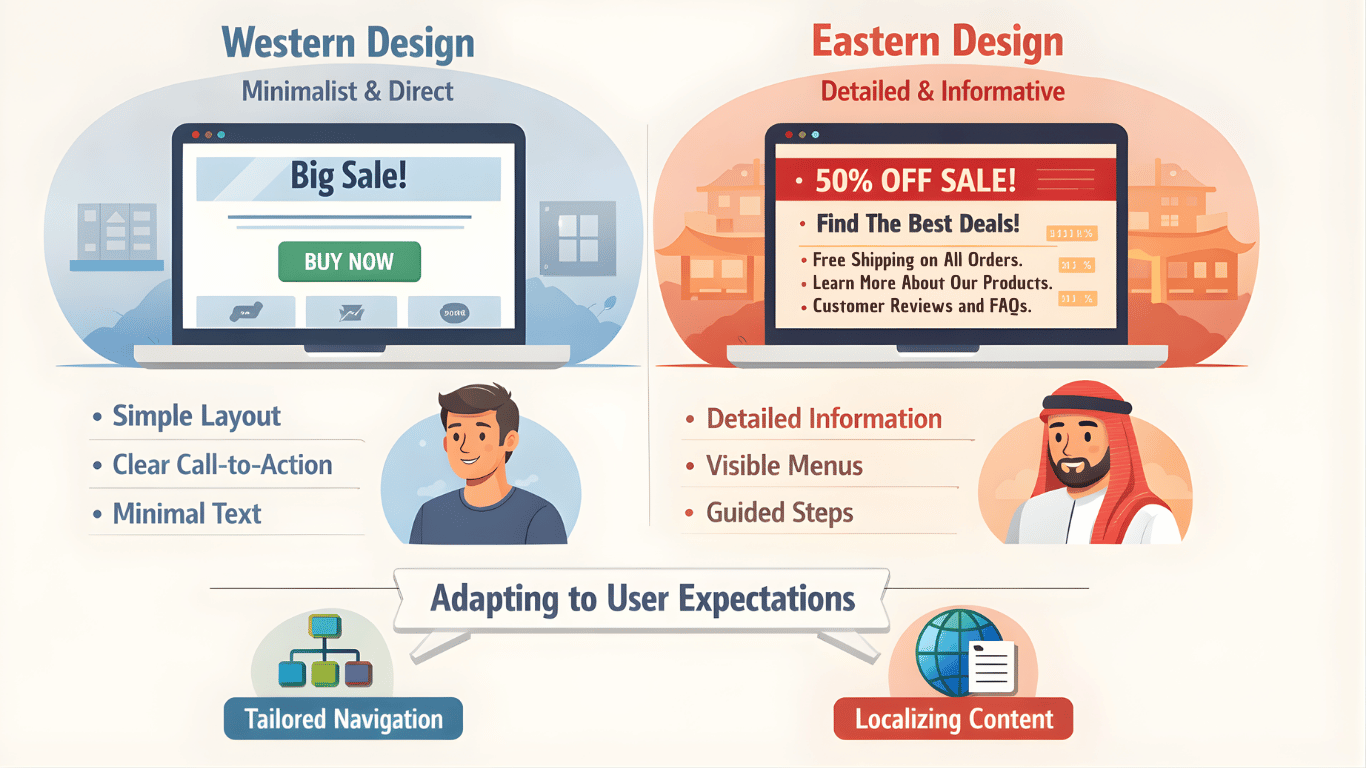
For instance, a website designed with minimal text may feel incomplete to users who are accustomed to more information upfront. Website localization is essential, as adjusting navigation structure and interaction patterns helps users feel familiar with the product and reduces friction.
5. Functional Local Adaptations
Localization also includes adapting functionality to match local user behavior. This can involve supporting regional payment methods, adjusting address formats, or offering locally preferred login options.
For example, a checkout page that only accepts credit cards may work well in some countries but fail in regions where users prefer QR payments, mobile wallets, or UPI. By integrating these local options, products create smoother and more trustworthy experiences for users.
Translation versus Localization: Understanding the Difference
It is easy to assume translation is the same as localization, but they are not interchangeable.
- Translation converts text from one language to another.
- Localization adapts content and design elements to fit the target market’s cultural and linguistic expectations.
Translation is a crucial step, but it is only part of the journey. Localization embeds translation within an experience that feels authentic and intuitive. One common mistake companies make is stopping at translation and neglecting broader localization needs.
This often leads to low engagement, confusion, and poor adoption. You can read about differences between translation and localization here.
A Strategic Approach to UX Localization
Successful UX localization requires a well-structured process, coordination across teams, and attention to detail. Here is a step-by-step guide to help you make your global product feel local:
1. Conduct In-Depth Market Research
Before you start localizing, you need to understand the audience you are designing for. This includes:
- Language preferences
- Cultural norms and expectations
- Technology habits
- Competitive products in the local market
Market research informs decisions on what to localize and how to tailor your UX. It also helps you anticipate market-specific needs that can shape product strategy.
2. Design With Flexibility in Mind
Localization works best when it is considered from the beginning of the design process, not as an afterthought. Design systems should allow for:
- Text expansion, as some languages are longer than others
- Direction changes such as right-to-left scripts
- Flexible layouts
- Customizable UI components
A flexible design framework makes localization smoother and prevents costly redesigns later.
3. Collaborate With Native Experts
Local translators and cultural consultants bring insights that technology cannot replicate. They help refine tone, contextual meaning, and cultural relevance in a way that resonates with users. Work closely with them throughout the process, from planning to translation review.
4. Optimize the Breakdown and Payment Experience
Users expect seamless experiences, especially during high-value interactions such as checkouts. Localization here means:
- Supporting local payment methods
- Displaying prices in local currency
- Clarifying taxes, shipping, and fees
- Adjusting form fields to local needs such as name formats or postal codes
Small details like these have a big impact on user satisfaction and conversions.
5. Quality Assurance and User Testing
Once your product is localized, continuous testing is essential. This includes:
- Design validation: Check layouts, visuals, and typography for cultural appropriateness
- Functional tests: Ensure date pickers, currencies, and other elements behave correctly
- User feedback: Local users provide invaluable insights into usability and comprehension
Testing not only catches errors but also ensures your UX feels native in each locale.
Common UX Localization Mistakes to Avoid
Even seasoned teams can make missteps. Here are pitfalls to watch out for:
1. Treating Translation as the End Goal
Translation is vital, but it should not be the final step. A product that is translated but not localized will still feel foreign to users.
2. Ignoring Cultural Preferences
Cultural context influences how users interpret content, imagery, and interaction patterns. Neglecting these nuances leads to alienation and low engagement.
3. Overlooking Technical Constraints
Some languages expand text length or use different scripts, which can break layouts that are not adaptable. Designing with localization in mind prevents these issues.
4. Neglecting After-Sales Support
Products do not end at purchase. Localized customer support, including language-appropriate help channels, reinforces trust and loyalty.
Read more about this here.
Examples of Effective UX Localization
Many global brands offer excellent models for UX localization:
- Spotify tailors playlists and podcasts regionally while supporting dozens of languages.
- Airbnb adapts currency, date formats, and travel content based on location.
- Disney+ Hotstar’s India version prioritizes local content and adjusts features for local user behavior.
These examples show that the different types of localization highlight how localization is not a one-size-fits-all exercise, but a dynamic, user-centric strategy shaped by user needs and context.
The ROI of Localization
Investing in localization pays off. Localized products tend to see:
- Lower bounce rates
- Higher engagement
- Better conversion and retention
- Increased market growth
Studies show that culturally adapted experiences boost usability and satisfaction, often leading to measurable business gains.
Conclusion
Making global products feel local goes far beyond translation. It involves adapting language, visuals, and interactions to match local expectations and user behavior. With the right UX localization strategy, products can feel intuitive and meaningful to users worldwide.
Whether entering one market or many, prioritizing localization helps users connect with your product. And that connection is what drives global success.
FAQ
What is the difference between translation and localization?
Translation is about rewriting content in a different language. Localization goes beyond words and adapts the product experience to fit cultural norms, visuals, and interaction patterns, making users feel the product is native to their region.
Why is UX localization important for global products?
- Ensures users feel comfortable and understood
- Improves usability and navigation
- Boosts engagement, retention, and conversions
- Builds trust and strengthens brand reputation
Which elements of a product should be localized?
Key elements include language and tone, date and number formats, currency, visuals, navigation patterns, and functional features like local payment methods and support channels.
How can companies implement UX localization effectively?
- Conduct market research to understand local user preferences
- Design flexible layouts that accommodate different languages and scripts
- Work with native translators and cultural experts
- Optimize localized features such as forms, checkouts, and notifications
- Perform quality assurance and user testing to ensure the experience feels natural
Can localization increase revenue for global businesses?
Yes. Localized products enhance user experience, reduce friction, and build trust. This often leads to higher engagement, better retention, improved conversions, and access to new markets, ultimately boosting revenue.